HolyBro Atlatl HV 5.8G 3W VTx

| No Review
₹8499
Holybro’s latest Atlatl VTX. This video transmitter offers a variable power supply, from 25mW (UK legal limit) up to 3W. Running at 3W generates a lot heat, so the VTX incorporates a built-in fan. It also has Pit Mode so that you can power up your VTX to change settings without knocking other pilots out of the air. There is also SmartAudio which allows you to control your VTX via your flight controller to change channel and transmitting power remotely from your RC. The Atlatl VTX comes with a …
Categories: FPV Equipment / Video Transmitter Brand: Holybro SKU: 13038
Share :

Holybro’s latest Atlatl VTX.

This video transmitter offers a variable power supply, from 25mW (UK legal limit) up to 3W. Running at 3W generates a lot heat, so the VTX incorporates a built-in fan. It also has Pit Mode so that you can power up your VTX to change settings without knocking other pilots out of the air. There is also SmartAudio which allows you to control your VTX via your flight controller to change channel and transmitting power remotely from your RC. The Atlatl VTX comes with a durable MMCX connector and also with a pigtail SMA converter.

WARNING: MAKE SURE TO INSTALL ANTENNA BEFORE TURNING ON THIS VIDEO TRANSMITTER

Specifications

Frequency 5.8G
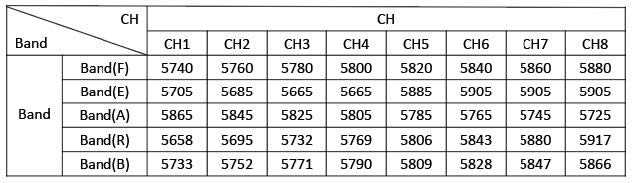
5 bands: A, B, E, F, R
Transmission Channel: 37
Operating mode Key button, Smart Audio
Transmission power Switchable: PIT, 25mW, 3000mW
Antenna connector MMCX
Power input 7-36VDC
Current consumption 800mA/12VDC @ 3000mW
RF impedance 50Ω
Inputvideo impedance 75Ω
Input video amplitude CVBS 0.8~1.2VP-P
Video format NTSC/PAL
Dimension(L*W*H) 40.8mm*24.8mm*13.3mm

WARNING: MAKE SURE TO INSTALL ANTENNA BEFORE TURNING ON THIS VIDEO TRANSMITTER

Indicator Light Description

  • #1 Power light
    • Off – 25mW
    • Steady on – 3000mW
    • Flashing – PIT mode
  • #2 Frequency indicator light
    • The first frequency of each frequency band is always on and flashes when switching.
  • #3-#7 Frequency band lights
    • #3 – F frequency band
    • #4 – E frequency band
    • #5 – A frequency band
    • #6 – R frequency band
    • #7 – B frequency band

Function Button Operation Instructions

  • To switch frequency – Click the button, the red-light flashes and goes out, then you can switch to the next frequency.
    • (Note: The red light of the first frequency of each frequency band is a constant light indicator)
  • To switch frequency band – Press and hold the button for 2 seconds. When the blue light flashes, release the button to switch to the next frequency band.
  • To switch power – Press and hold the button for 4 seconds

Frequency Table

Package Includes:

  • Atlatl HV 5.8G 3000mW VTx *1
  • 80mm SMA–MMCX Cable *1
  • 70mm 6pin JST SH wire *1
My Cart
Cart Page
My Wishlist
Wishlist Page

We may use cookies or any other tracking technologies when you visit our website, including any other media form, mobile website, or mobile application related or connected to help customize the Site and improve your experience. Read our cookie policy